Published on: 26 Jan 2026
Author: Himanshu Sharma
How to Set Up a Modern Linux Terminal with Fish & Starship
Fish Shell + Starship Prompt
This guide shows how to configure a modern Linux terminal using Fish and Starship for a fast, beautiful, and developer-friendly experience.
Step 1 – Install Fish
sudo apt update
sudo apt install fish
Run Fish:
fishMake it the default shell:
chsh -s /usr/bin/fishLog out and log in again. !
Step 2 – Install Starship
curl -sS https://starship.rs/install.sh | shPress Enter when prompted.
Step 3 – Enable Starship in Fish
Create or edit Fish config:
nano ~/.config/fish/config.fishAdd this line: (Ctrl + Shift + V)
starship init fish | sourceSave and close. (Write: Ctrl + 0, Save: Press Enter, Exit)
Restart the terminal.
exec fishResult
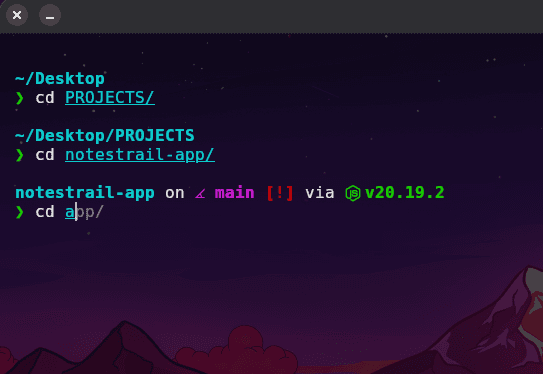
Your terminal now has:
- Smart auto-suggestions
- Git branch info
- Python & Node version
- Clean modern prompt
A true pro-level Linux terminal setup 🚀