Published on: 29 Jan 2026
Author: Himanshu Sharma
Fix ESP32 Connection Timeout Error While Downloading Board Package in Arduino IDE

If you are getting errors like this while installing ESP32 boards in Arduino IDE:
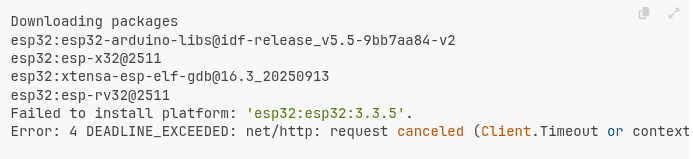
This happens because the default network timeout in Arduino CLI is too low for slow or unstable connections.
Step 1: Locate arduino-cli.yaml
Arduino IDE uses Arduino CLI internally, and its config file controls network behavior.
Default locations:
Linux
~/.arduino15/arduino-cli.yamlmacOS
~/Library/Arduino15/arduino-cli.yamlWindows
C:\Users\YOUR_NAME\AppData\Local\Arduino15\arduino-cli.yamlIf the file does not exist, create it.
Step 2: Edit the File
Open the file:
nano ~/.arduino15/arduino-cli.yamlAdd this:
network:
  connection_timeout: 1200s
Step 3: Restart Arduino IDE
Completely close Arduino IDE and open it again.